Debug your Control4 driver on your own machine
The Driverforge CLI's new run command puts your driver's Lua on your own computer while a real controller keeps driving it. Save a file, and the next touchscreen tap or programming rule that reaches your driver runs the new code, with your coding agent and your debugger right there.
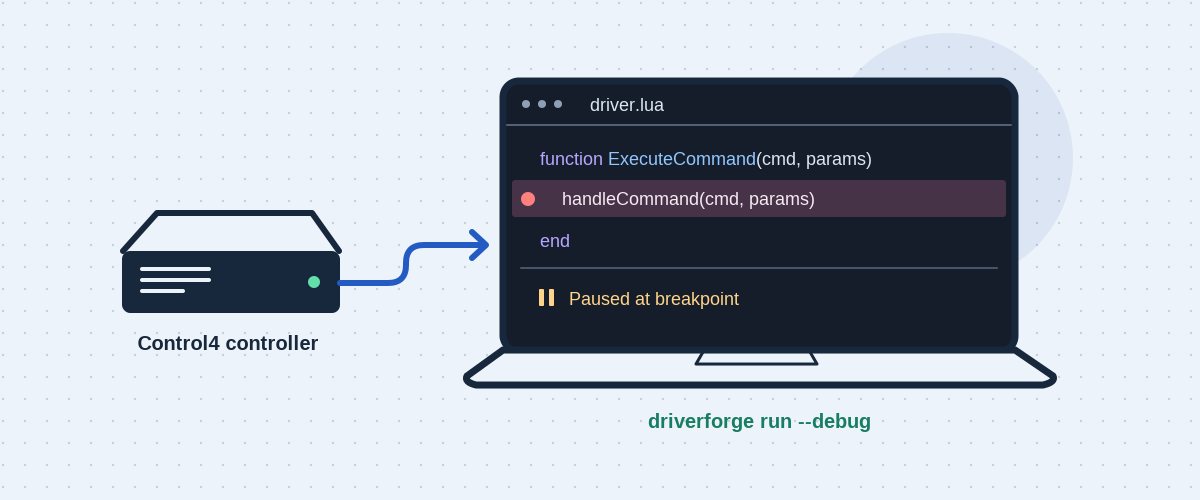
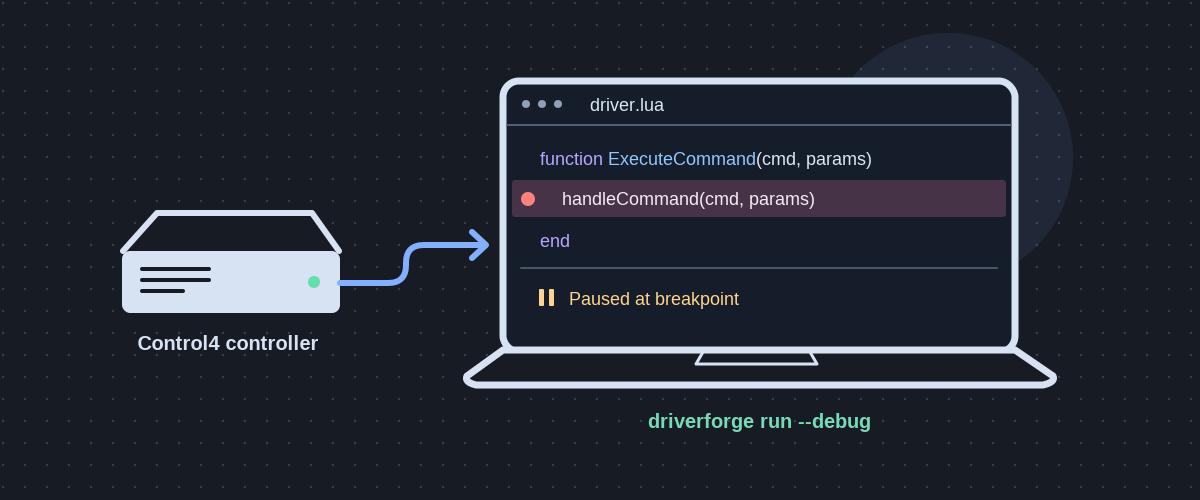
A Control4 driver is a package of Lua and XML that runs inside Director on a Control4 controller. Director calls your code whenever something happens that concerns your driver. Someone might tap it on a touchscreen, press a button on a remote or use the Control4 mobile apps. Another device might send it an event. Programming set up by the installer in Composer might run one of its commands. Or one of its timers might expire.
Your driver lives on a controller. Your code, editor and debugger live on your local dev machine. Until now, the only way to get code from one to the other was to package it and install it.
The Driverforge CLI's new run command changes that:
driverforge runYour driver's code runs on your own computer, as an ordinary Lua process, while the real controller calls into it exactly as it would call the installed driver. You edit a file, save it, and make the same thing happen again: tap the same control on the touchscreen, or let the same programming run. run reloads your driver in the Lua process on your computer as soon as you save, and the next callback runs the new code there. Nothing is built, and nothing on the controller changes.
If you've worked with cargo run, sst dev or hot module reload, this is that loop, for drivers that control real hardware.
run joins deploy and sync as the third way the Driverforge CLI gets your latest code executing against a controller. Each one gets there differently, and further down we cover which to reach for when.
What you get
- Your code stays on your computer. A change is just a save.
runreloads your driver in the Lua process on your machine, and the next time the controller calls your driver it runs the new code. There's no build, and nothing is sent to the controller. Init hooks don't run again and state held in globals carries over, so the situation you set up to reproduce a problem is still there when you try the fix. - Debug from your IDE.
--debugattaches your IDE's Lua debugger to the driver running on your computer. Set breakpoints in your handlers, then tap your driver's control on a touchscreen or let a programming rule fire. Execution pauses on your breakpoint, and you can step through the handler line by line, inspect local variables and the arguments Director passed in, and watch the controller's real responses come back before you continue. - Output where you're working. Your log output and errors appear in the terminal as they happen. Add
--verboseand you also see every call your driver makes into the controller, with its result. If your driver uses the Anvil SDK, its logs and errors are captured in Anvil as well, with stack traces from your local code, so a session leaves the same record as the installed driver would. - A loop your coding agent can drive. Under an agent, every callback, call, print and error arrives as a line of JSON, so the agent sees what its edit did without reading a log or waiting for a deploy.
- A real controller on the other end, not a simulator. Your code runs on your computer, but every device, binding and firmware behaviour it touches is the real one.
- Fast by default. Traffic between your computer and the controller goes over your local network through the Anvil Agent, and falls back to our cloud broker automatically when it can't.
- A clean finish.
--deploy-on-exitputs your real driver back on the controller when you stop, and confirms it's running.
One command, then save
Start it once from your driver project:
$ driverforge run --deploy-on-exit
✓ Stub online as poolpump; starting the driver locally
✓ Local network relay up through the agent: C4 calls skip the cloud
✓ Driver running locally (12 handlers)
← ExecuteCommand("SET_SPEED",{SPEED="2400"})
  | pump speed set to 2400 rpm
  changed: driver.lua
✓ Reloaded driver source
The arrow line is Director calling into your code because a programming rule ran your driver's SET_SPEED command, perhaps a schedule that speeds the pump up each morning. The | line is your own print. changed: driver.lua is you saving a file, and Reloaded driver source confirms the new code is loaded in the local process: the next time that command runs, the edited handler is the one that answers. If the file you saved doesn't compile, run tells you and the previous code keeps running, so a typo never takes the driver down.
Your driver compiles locally before anything touches the controller, so a syntax error costs you a second at your desk instead of a failed install. Ctrl+C ends the session. With --deploy-on-exit the CLI builds your driver and installs it on the controller in place of the stub, then confirms it's running; without it, run driverforge deploy whenever you're ready.
All run needs is a signed-in CLI, a controller running the Anvil Agent, and a Lua 5.1 interpreter on your machine (brew install luajit is the quickest).
Hand the loop to your agent
More and more driver code is written by coding agents, and an agent has the same problem a person does: it can change a file but can't see what the controller did with it. When run is under an agent, or DRIVERFORGE_OUTPUT=json is set, each event is one line of JSON:
{"event": "callback", "summary": "ExecuteCommand(\"SET_SPEED\",{SPEED=\"2400\"})", "name": "ExecuteCommand", "args": ["SET_SPEED", {"SPEED": "2400"}]}
{"event": "print", "text": "pump speed set to 2400 rpm"}
{"event": "callback_result", "name": "ExecuteCommand", "ok": true, "handled": true}
The agent edits a handler and sees a reloaded event once the new code is loaded locally. The next time the action fires, it reads the callback and its arguments from the stream it's already watching, along with every call the handler made into the controller and any error it raised. Making a change and checking it against real hardware becomes one loop the agent can run on its own.
Breakpoints on your own machine
Sometimes reading output isn't enough and you want to stop on a line and look around. Because your driver is a local Lua process, a standard Lua debugger can attach to it. --debug uses MobDebug, the remote debugging protocol that ZeroBrane Studio and the VS Code Lua MobDebug adapter both speak:
driverforge run --debug                    # debugger listening on localhost:8172
driverforge run --debug=192.168.1.20:8172  # debugger on another machine
In VS Code, add an attach configuration to your project's .vscode/launch.json:
{
  "name": "driverforge run --debug",
  "type": "luaMobDebug",
  "request": "attach",
  "workingDirectory": "${workspaceFolder}",
  "sourceBasePath": "${workspaceFolder}",
  "listenPort": 8172,
  "stopOnEntry": false
}
Press F5 so VS Code is listening, then run driverforge run --debug. Set a breakpoint in your handler, then make it run: use the driver from a touchscreen or remote, or trigger the programming that calls it. VS Code stops on the line with the callback's arguments and your driver's tables in scope, along with the controller's real responses. Breakpoints in your project's source files match without any path mapping, because run loads them straight from your project.
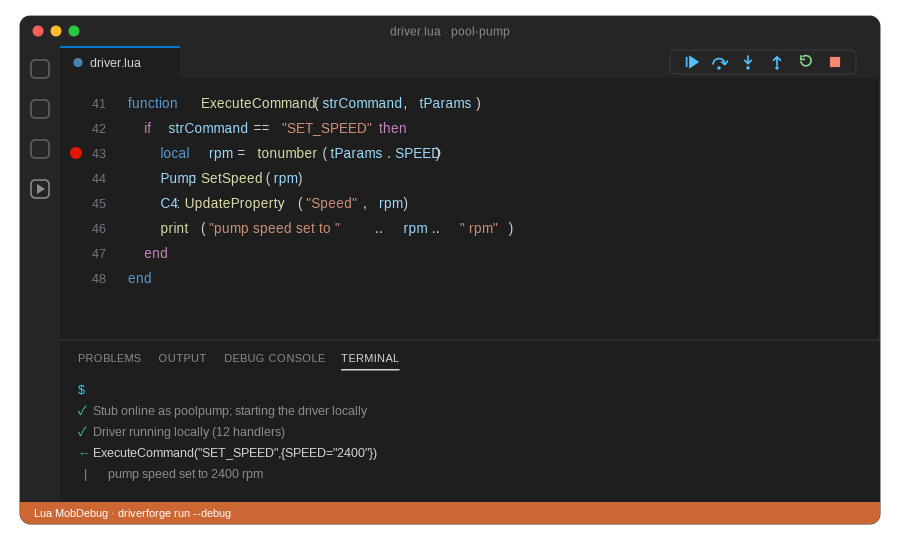
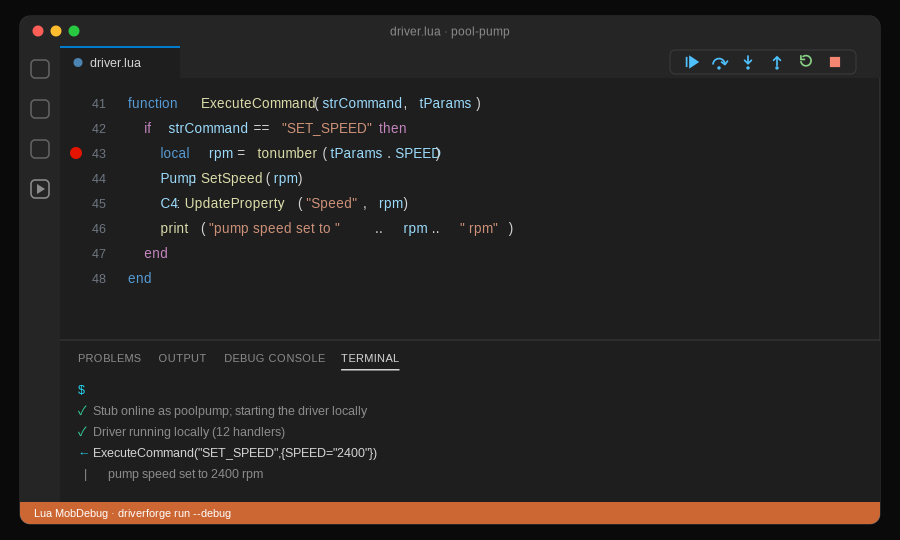
While you're paused, only the Lua process on your computer waits. The controller keeps running and the session stays connected, and callbacks that arrive in the meantime queue up for when you continue. Without --debug no debugger is loaded at all, so everyday sessions run at full speed.
MobDebug and LuaSocket need to be installed for the Lua 5.1 interpreter run uses; luarocks --lua-version 5.1 install mobdebug does both. The command reference has the ZeroBrane Studio steps and setup for other editors.
How it works
run works by putting a stand-in for your driver on the controller. It passes each call from Director to your computer, runs your code there, and passes the results back.
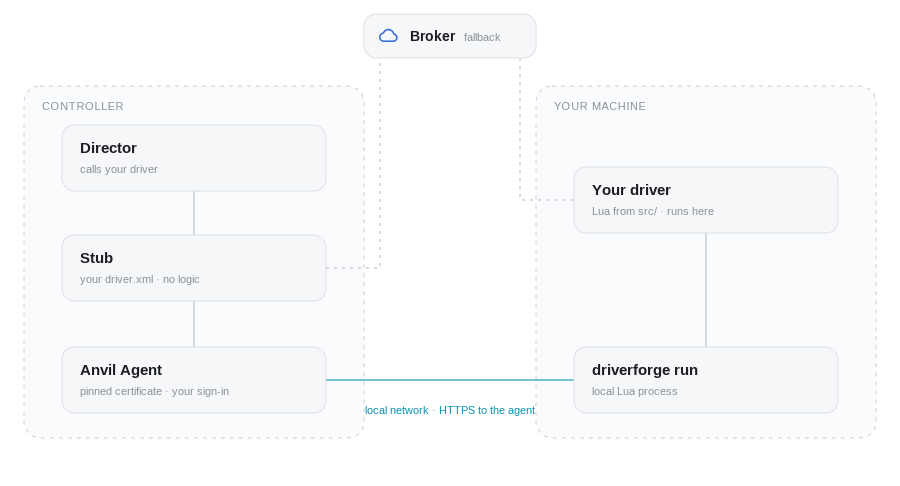
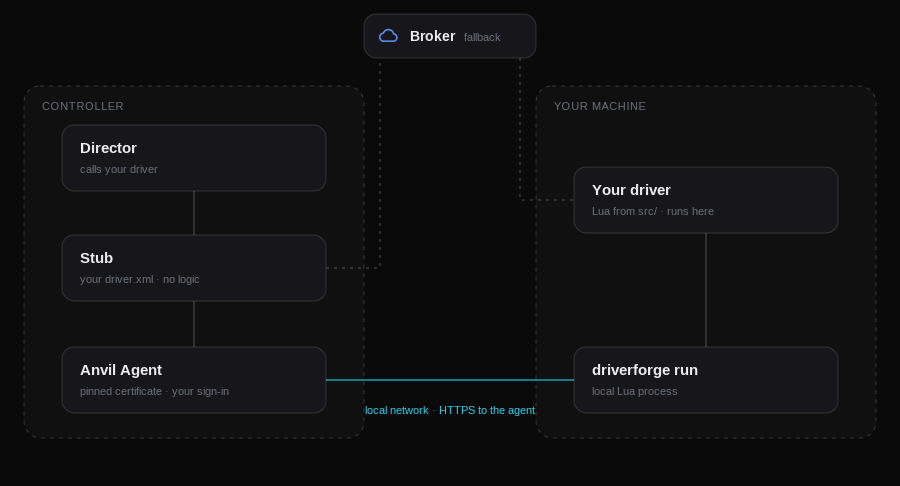
When a session starts, the CLI builds your project exactly as a deploy would, then swaps the Lua inside the package for a small stub and installs that on the controller through the Anvil Agent. Your driver.xml goes in byte for byte, so to Director and to the rest of the project it is still your driver: the same properties, the same proxies, the same bindings to other devices.
The stub has no logic of its own. It forwards every callback Director can make, from ExecuteCommand and ReceivedFromProxy to OnPropertyChanged, so whichever handlers your local code defines are the ones that answer. Add a handler mid-session and it starts receiving calls as soon as you save; a callback your driver doesn't handle yet shows up in Anvil as not implemented, so you can see what Director is asking for. When Director makes a call, the stub sends the callback's name and arguments to your computer, along with the driver's current Properties and PersistData, and hands control straight back to Director. The handler itself runs on your computer, in the Lua process run started. At startup the stub also copies Director's constant tables, such as C4SystemEvents, so your code sees the same values it would on the controller.
When your code calls into the controller, to read a property or send a command to another device, the call travels back to the stub. The stub makes it against the real C4 object and returns the result. Objects the controller creates, like a timer or a URL request, stay on the controller. Your code holds a reference, and the stub routes each method call on it to the real object. Callbacks you hand to those objects, such as a timer's expiry function, come back to your computer the same way Director's callbacks do. From your driver's point of view it's running on the controller, even though every line of it executes on your computer.
Each of those calls is a round trip, so run sends them over your local network. It reuses the HTTPS connection to the Anvil Agent that driverforge deploy already makes, with the same pinned certificate and the same sign-in, so wherever you can deploy you get the fast path and there's nothing new to open on the network. If that connection drops, the session moves to our cloud broker without losing a call. Unanswered calls are sent again, and the stub recognises a repeat and returns its first answer, so nothing runs twice on the controller. --no-relay keeps the whole session on the broker, for when your machine can't reach the controller directly.
When you stop run, the stub stays installed and does nothing until your driver replaces it. --deploy-on-exit does that for you; otherwise driverforge deploy puts your driver back whenever you're ready.
Deploy, sync or run
All three commands take the code in your editor and get it running against a real controller. They differ in where the code runs and what it costs to get it there.
driverforge deploy builds the full package and installs it on the controller, and the driver restarts. It's the only one of the three that picks up changes to driver.xml, such as new properties, actions or connections, and it's how your driver ends up running on its own when you're done. We wrote about it in Shipping driver builds straight to a Control4 controller.
driverforge sync sends only your Lua to the driver already installed on the controller, without a restart, so its in-memory state survives. Your code still runs on the controller, at the controller's speed, which makes sync the right check that a change behaves the same once it's installed.
driverforge run keeps your code on your computer and lets the controller call into it. A change is a save, and you get your terminal, your coding agent and your debugger alongside it. Because the stub carries the driver.xml your session started with, a change to driver.xml means stopping run and starting it again.
A few things to know
Your code and the controller are both real, with a network between them, and that shows up in a few places.
Director doesn't wait for your handler's return value. Handlers like UIRequest and GetPrivateKeyPassword run, but Director sees nil.
Each session starts fresh. Installing the stub restarts the driver on the controller, so in-memory state from before the session is gone. Properties and PersistData reach your code on every callback, but PersistData writes aren't saved during a session.
A save re-runs your driver from the top. Reloading in the local process runs your entry file again, so file-level code runs again too. A table created with g_devices = {} at the top of a file is emptied on every save, while g_devices = g_devices or {} keeps what it held. Anything declared local at file level starts fresh.
Timing differs. A call into the controller takes a network round trip, so code that races a timer won't behave exactly as it does when installed.
One session per driver. Starting run against a driver someone else is already running on the same controller replaces their session.
Try it
Update the CLI and your controller's agent with driverforge upgrade, open a driver project and run driverforge run. The run reference covers every option, the debugger setup for each editor, and troubleshooting.