Introducing the Anvil MCP server for Control4 developers
Bring the DriverWorks docs and live driver telemetry into your coding agent. Available now on all Anvil developer plans.
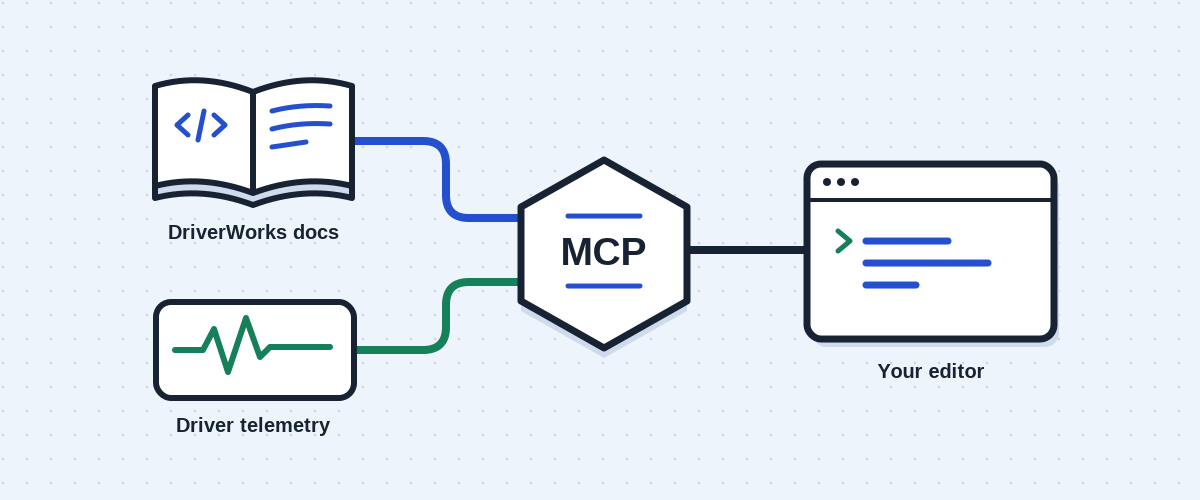
Today we’re launching the Anvil MCP server on every Anvil developer plan. It brings two things into the editor where you write your Control4 drivers: the DriverWorks documentation for the OS you support, and a record of what your driver actually did on a controller.
Those two things belong together. Take a thermostat driver. When you’re writing it, you want to know what Control4 sends when someone turns up the heat. Once it’s running, you want to know what this thermostat driver received the last time someone turned the dial. You ought to be able to ask both questions in the same conversation, with the handler open in front of you. That’s what we built.
One connection from your editor
MCP stands for Model Context Protocol. When your coding agent connects, Anvil tells it which tools it can call, what each tool takes and what comes back. You can ask for “the last setpoint change on my dev controller” in plain English. The agent can use one tool to find the project, another to find the callback and a third to fetch the complete event.
We host the server at https://mcp.driverforge.com/mcp. In Codex, these two commands add it and start sign-in:
codex mcp add driverforge --url https://mcp.driverforge.com/mcp
codex mcp login driverforge
In Claude Code, add the endpoint over HTTP:
claude mcp add --transport http driverforge https://mcp.driverforge.com/mcpApprove access in your browser with your Driverforge account. In Claude Code you can also open /mcp, select driverforge and choose Authenticate. The server is read-only and your existing Anvil project permissions apply. To check both the connection and the account, ask “Which Anvil projects can I see?” Setup for Cursor, Gemini CLI and VS Code.
Before the thermostat is even plugged in
Here’s a first request you can try before you connect any hardware:
When someone turns up the heat in the Control4 app, how does my thermostat driver find out what temperature they chose? Show me where that’s documented.
The agent can use search_control4_docs to search the thermostat proxy guide for a heating setpoint. That gives it a command name to work with, SET_SETPOINT_HEAT, and a link to Snap One’s guide. It can then use get_control4_doc to read the full section and show you which parameter carries the requested temperature. That matters when the name is obvious and the thing you actually need is a note under the parameter table. We sync the Lua API, XML reference and proxy guides daily, so the agent can consult the same material you’d pull up yourself.
Now ask “We want to support Control4 OS 3.1 onwards. Does this command work on 3.1?” The agent can pass 3.1 as the target version when it looks up the command. Where Snap One gives an introduction version for a section, Anvil checks it against your target and flags anything that requires a newer OS. Version notes for individual parameters stay in the full text, where the agent can read the qualification before suggesting code.
When you’re ready to run the driver on your dev controller, the same connection can fetch the SDK integration instructions for your Anvil project. Ask for the setup guide by project name. The agent can resolve the project and retrieve instructions with its project token already filled in. Once the driver is reporting, the next question gets much more interesting.
Follow one turn of the dial
I’m about to raise the setpoint. Watch my dev controller for the thermostat callback on the version I just deployed. Tell me what value the driver received and what it logged while handling it.
The timing here matters. If the agent fetches “the latest event” after you turn the dial, it might get a timer firing a moment later. Give the agent the version printed by your deploy. It can scope the read to that version and controller, and record a start time before it asks you to turn the dial.
Here’s an illustrative wait_for_telemetry call for that request. The project, controller, version and time are example values:
{
  "projectId": "thermostat",
  "device": "dev",
  "driverVersion": "104",
  "since": "2026-10-22T09:00:00Z",
  "kind": "events",
  "eventNames": ["ReceivedFromProxy"],
  "match": ["SET_SETPOINT_HEAT"]
}
The server first checks what arrived since that timestamp, then waits for a match. You can turn the dial as soon as the agent asks. The result includes the matching entries, the scope it actually read and whether the condition was met. If the wait times out, the agent can tell you exactly which callback it was watching for on which build.
The interesting part is what happens to the result. Each event carries a trace ID. The agent passes that ID to get_event and gets the handler arguments, its return value and the log lines it emitted, in order. A temperature update from the next room might land in the same second. It has its own trace ID. Now the agent can show you the value Control4 sent alongside the line your Lua logged for that very call.
The same question after the dev session
You don’t have to be there when the event happens. Ask for yesterday’s setpoint changes and the agent can search recorded events by callback, controller and build. If your starting point is a warning you remember seeing, it can search logs by message text or severity instead. Each list result reports the time window searched, including when your plan’s retention shortened it.
If someone sends you an Anvil error reference, start there. A single lookup shows how often the error occurred, which versions and controllers saw it, and the most recent occurrence’s stack trace with the arguments and logs from the failing call. Upload a source map and the trace points back to your own source. From there you can ask a useful release question: “Has this happened on the new version too?” How Anvil captures driver errors.
We’ve packaged three of these workflows as MCP prompts. Pick observe_action to watch your dev controller live, diagnose_error when you have an error reference, or verify_change to compare two builds under the same filters. The CLI handles the deploy. The MCP server gives your agent a way to read what happened on either side of it. Full tool and prompt reference.
Try the MCP server with your own driver
The MCP server is available on all Anvil developer plans. Start with something you do in the Control4 app. Ask which command your driver receives and where it’s documented. Then, on a controller reporting to Anvil, ask for the last time your driver handled it. You’ll have the spec and the real call side by side.